How to Read a Receipt: Every Code, Letter and Number Explained

Most people look at a receipt exactly twice: once to check the total, and once more when something has gone wrong. That second look is usually the difficult one, because a receipt is not written for the customer. It is written for the retailer’s own systems, and the customer is simply allowed to keep a copy.
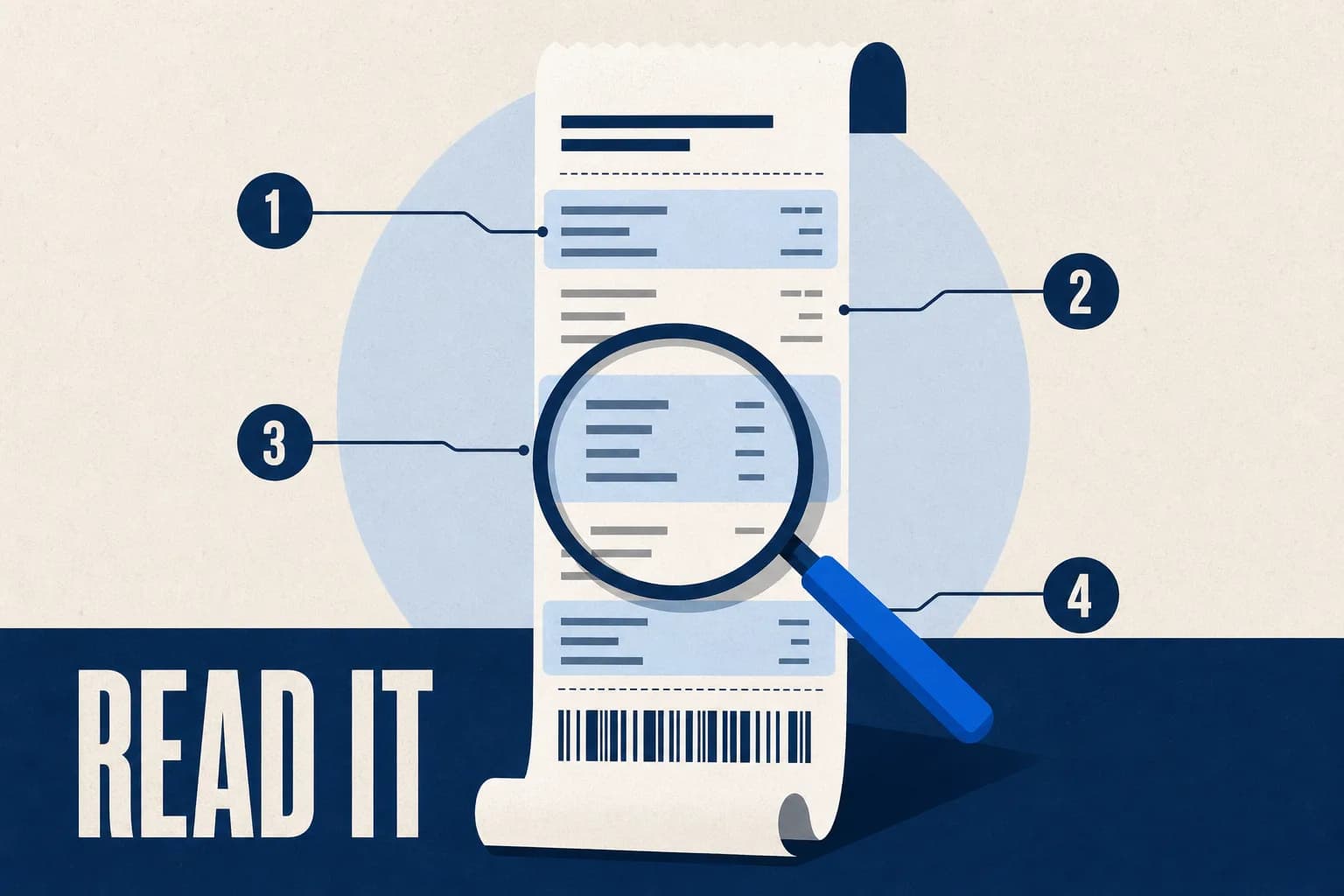
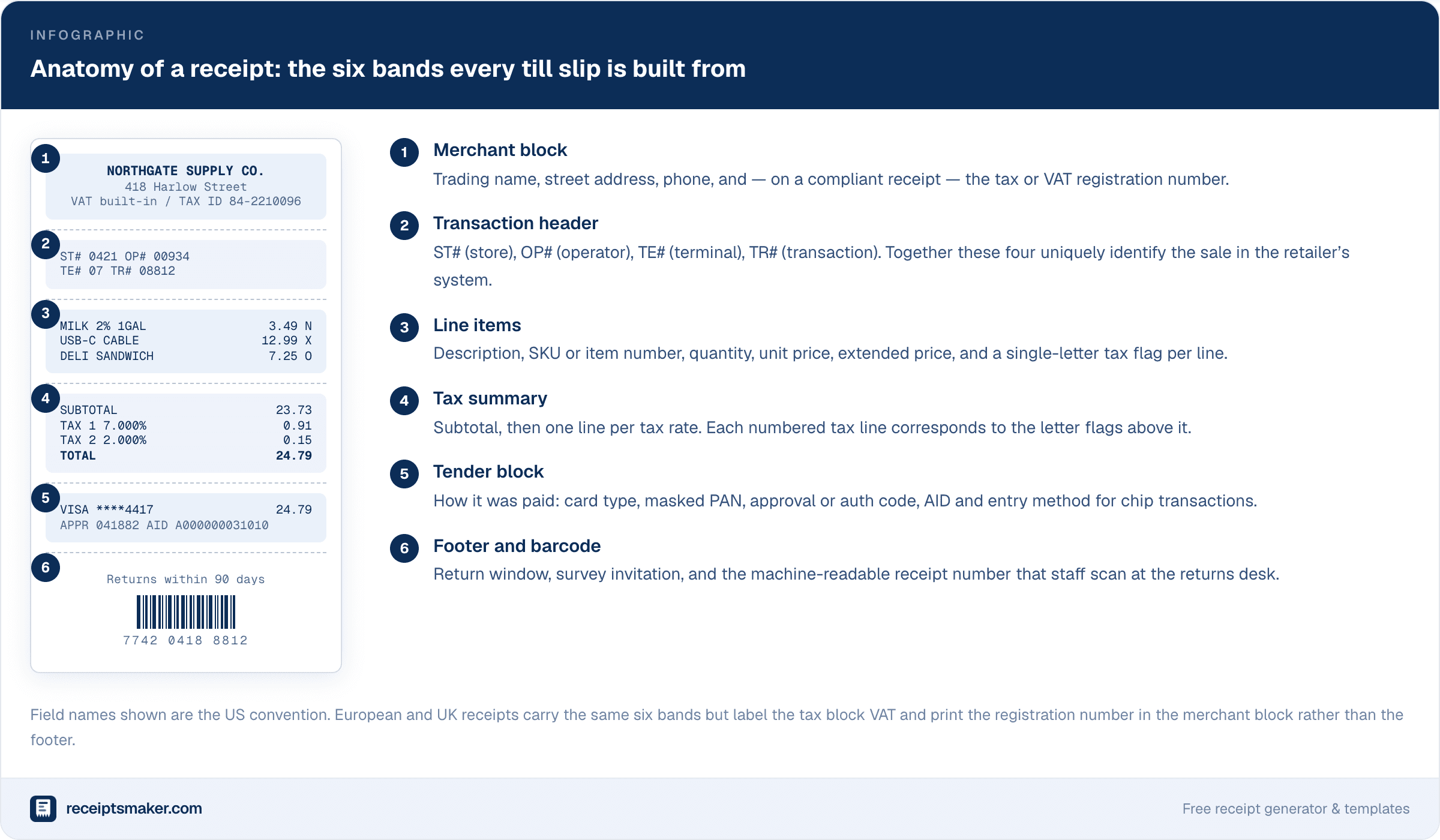
The good news is that receipts are far more standardised than they look. Whether it came from a supermarket in Ohio, a hardware store in Manchester, or a taxi in Lisbon, almost every point-of-sale receipt is assembled from the same six bands in the same order. Once you can name the bands, the cryptic codes stop being cryptic — each one belongs to a band, and each band has exactly one job.
Why Every Receipt Shares the Same Structure
The layout is not a design convention. It is a consequence of how the transaction is actually assembled inside the till. The register builds the sale in a fixed sequence — identify the store, open a transaction, add lines, calculate tax, take payment, close — and it prints each stage as it completes. The receipt is a printed log of that sequence, which is why it always runs in that order and why nothing ever appears out of turn.
This is also why receipts from wildly different businesses feel familiar. A restaurant receipt and a parking receipt look nothing alike at a glance, but both carry a merchant block, a transaction header, lines, a tax summary and a tender block. The restaurant just has more lines and the car park has more timestamps.
Band 1: The Merchant Block
The header identifies who took your money. It carries the trading name, the physical address of that specific location, and a phone number. On a compliant receipt it also carries a tax registration number — an EIN or state sales tax permit in the US, a VAT number in the UK and EU, a GST number in Canada, Australia and India.
That registration number is the single most overlooked field on the entire slip, and it is the one that decides whether a receipt is usable. Without it, a business buyer generally cannot reclaim input VAT, and an auditor cannot confirm the seller was registered to charge the tax in the first place. If you are producing receipts for your own business, this field is not optional decoration — our receipt templates put it in the header by default for exactly that reason.
One practical detail: the address printed here is the store, not the head office. On a chain retailer’s receipt this is how you prove which branch you visited, which matters enormously for returns, warranty claims, and any dispute where the retailer says the transaction never happened.
Band 2: The Transaction Header — ST#, OP#, TE#, TR#
This is the block that confuses people most, and it is genuinely the most useful one to understand. Four short numbers, usually printed together, uniquely identify your sale among the billions the retailer processes.
- ST# — store number. The retailer’s internal identifier for that branch. It is not the same as a postcode or a street address; it is the number their systems actually use.
- OP# — operator number. The cashier’s till login. This is how a retailer identifies who served you, which is why staff are told never to share logins.
- TE# — terminal number. Which physical register in that store. Useful when a card reader is faulty and a chain of transactions needs investigating.
- TR# — transaction number. A counter that increments through the trading day and resets overnight.
Here is the part that is rarely explained: none of these four numbers is unique on its own. TR# 08812 happens in every store, every day. It is the combination of store, terminal, transaction number and date that forms the composite key the retailer uses to retrieve your sale. That is why a customer service agent will ask for all four, and why quoting only the transaction number gets you nowhere.
If you ever need a retailer to find a transaction you have lost, photograph this band first. It is worth more than the total.
Band 3: Line Items and the Tax Letters
Each line typically carries a description, an item number, a quantity, and a price — followed by a single letter or symbol. That trailing character is a tax flag, and it is the key to understanding the tax block further down.
The critical thing to know is that these letters are not standardised across retailers. There is no industry body that assigns them. Each chain picks its own scheme, which is why the same letter means different things at different shops.
| Retailer | Common flags | What they signal |
|---|---|---|
| Walmart | N, X, O, T | N = non-taxable, X = taxable, O = non-taxable at a special rate, T = taxable. Numbered TAX 1–7 lines below map to categories such as general, food, prepared food, wine and beer. |
| Costco | A, E, F | A = taxable at the standard rate, E = exempt, F = food. The special deduction codes in the footer relate to instant rebates, not tax. |
| Home Depot | Item SKU + tax column | Leads with a long SKU rather than a letter; tax status is carried in a separate column and summarised by rate at the foot. |
| Target | T, N, F | T = taxable, N = non-taxable, F = FSA-eligible, which is a health-spending flag rather than a tax rate. |
| UK and EU retailers | A, B, C, D or * | Map to VAT rate bands — typically standard, reduced, zero and exempt — with a key printed near the VAT summary. |
The reliable method, therefore, is not to memorise letters. It is to find the key. Almost every receipt prints its own legend, usually immediately under the tax summary in small type. Read the legend, then read the lines. That single habit removes the guesswork on any receipt in any country.
One more thing worth noticing: an FSA or HSA flag — common on pharmacy receipts — looks like a tax letter but is not one. It marks items eligible for reimbursement from a health spending account, and it is the field your benefits administrator will actually look for.
Band 4: The Tax Summary
The tax block ties everything above it together. You should see a subtotal, then one line per tax rate applied, then the grand total. Where a retailer prints TAX 1, TAX 2 and TAX 3, those numbers correspond to the letter flags on the lines above — which is precisely why the flags exist.
A quick integrity check that takes five seconds and catches real errors: take the total of all lines carrying a given flag, multiply by the rate shown on the matching tax line, and compare. If it does not reconcile, either an item was rung up in the wrong tax category or a discount was applied after tax rather than before. Both are common, and both are worth challenging — mis-categorised tax is one of the most frequent till errors in grocery retail.
In the UK and EU the equivalent block is the VAT summary. It must show the VAT rate, the net amount, and the VAT amount separately. A receipt showing only a gross total is not a valid VAT invoice, no matter what it says at the top — a distinction we cover further in our guide to digital versus paper receipts.
Band 5: The Tender Block, Read Properly
This band records how the bill was settled, and it contains more forensic detail than most people realise. On a modern chip transaction you will typically find:
- Card scheme and masked PAN — the last four digits. The first six were historically the issuer identification number, though masking practice has tightened considerably.
- APPR or AUTH code — the approval code returned by the card issuer. This is the number a bank needs to trace a specific authorisation.
- AID — the Application Identifier, a long hex string such as A000000031010. It identifies which payment application on the chip was used. A0000000031010 is Visa; A0000000041010 is Mastercard.
- Entry method — CHIP, CTLS or contactless, SWIPE, or KEYED. This one carries real weight in disputes, because liability for fraud shifts depending on how the card was presented.
- TVR / TSI — terminal verification results. Rarely printed on consumer copies, but present on merchant copies.
The practical insight here is about the entry method. If a receipt says KEYED, the card was typed in by hand rather than read from the chip. For a card-present dispute that single word can move liability from the issuing bank to the merchant. If you are ever reconciling a suspicious charge, the entry method is the first field to check — well before the amount.
Cash transactions print a simpler block: amount tendered and change given. If you are creating cash receipts yourself, recording both figures rather than just the total is what makes the document credible later, a point we return to in receipts as proof of purchase.
Band 6: The Footer and the Barcode
The footer holds the return policy, the survey invitation, and — most importantly — the machine-readable receipt number. That barcode usually encodes the store, date, terminal and transaction number in a single string, which is exactly the composite key described earlier. When a returns clerk scans your receipt, that is what they are reading.
The return window printed here is the retailer’s own policy, not your statutory rights. Those are separate and generally cannot be reduced by anything printed on a receipt. In the UK, the Consumer Rights Act 2015 gives a 30-day right to reject faulty goods regardless of shop policy; in the US, rights vary by state and are largely governed by the implied warranty of merchantability. A shop can be more generous than the law. It cannot be less.
The survey code, incidentally, usually contains the same transaction identifiers. If the printed header has faded but the survey code survives, you can often still trace the sale — which brings us to the one weakness every thermal receipt shares.
The Sixty-Second Method
When you actually need to decode a receipt under time pressure — an expense query, a disputed charge, a warranty claim — work in this order rather than reading top to bottom:
- Find the legend first. Small type near the tax summary. It defines every letter used on the slip.
- Capture the composite key. Store, terminal, transaction number, date. Photograph this band before anything else.
- Reconcile one tax line. Confirms nothing was rung into the wrong category.
- Read the entry method. CHIP, CTLS, SWIPE or KEYED decides who carries liability in a dispute.
- Check the return window against the date, not against today. The clock started when the sale completed.
Five checks, roughly a minute, and you will have extracted everything the receipt is actually capable of telling you.
What a Receipt Cannot Tell You
It is worth being precise about the limits, because people routinely expect more from a receipt than it can deliver.
A receipt does not prove ownership — it proves a payment occurred. It does not prove who bought the item unless a named card was used. It does not establish the condition of goods at the point of sale. And on thermal stock, it does not last: the print is a chemical reaction, not ink, and it fades with heat, sunlight, and contact with plasticisers. We go into the chemistry in what is a thermal receipt, but the practical consequence is simple — anything you may need in three years should be photographed the week you receive it.
Where a receipt has been lost entirely, a reconstructed record supported by a written statement is the usual remedy, which we cover in detail in our guide to the missing receipt declaration.
Applying This to Receipts You Issue
If you are on the other side of the counter, the six bands double as a specification. A receipt that carries all six is accepted almost everywhere; one that skips a band is the one that gets queried.
The bands most often omitted by small businesses are the transaction header and the tax summary. Both feel like internal plumbing, and both are exactly what a bookkeeper or auditor looks for. A sequential document number in particular is a legal requirement for VAT invoices in most of Europe and strong evidence of a complete set of books everywhere else.
You can build a receipt that carries all six bands in a couple of minutes with our free receipt generator, or start from a format that already matches your trade — retail, service work, taxi and rideshare, or hotels.
Conclusion
A receipt looks like clutter because it is written in the retailer’s language rather than yours. But the vocabulary is small and the grammar is fixed: six bands, in order, every time. Learn the bands and the codes resolve themselves — the letters are defined by a legend printed on the slip, the four-number header is a composite key, and the tender block is a forensic record of how the card was presented.
Read in that order, almost any receipt gives up its contents in under a minute. And once you can read them, issuing good ones becomes considerably easier.